Usage
Commands
Make Commands are set up for making interacting with the app easy and straightforward. These commands can be run from the root directory of the repository and automatically handle any setup, configuration, or filesystem traversal that is needed to run the app.
Running the app with NPM
The app is still able to run through NPM, identically to how the repo was set up previously, however, due to configuration changes for building based on different target environments, application .env files will need to be put in the right place manuall, and with the right name in order to run correctly.
Any of the make setup-{environment}-build commands will put the .env in the correct place to allow running the client with npm run start.
Running the app with Docker
A collection of commands used to configure or run the app in different environment target modes.
| Makefile Command | Extends | Action | Run Config |
|---|---|---|---|
| setup-local | N/A |
Copies ./cashorbit-{client/server}/config/.env.local files and ./config/docker/docker-compose.local.yml to application and repo root | Setup command, nothing is run |
| run-local | setup-local |
Runs the docker-compose build command with the .envs and .yml provided by setup-local |
Local |
| client | N/A |
Runs the docker-compose up command for the cashorbit-client and cashorbit-server services. Attaches to cashorbit-client STDOUT | Config determined by the target |
| server | N/A |
Runs the docker-compose up command for the cashorbit-server service. Attaches to cashorbit-server STDOUT | Config determined by the target |
| docs | N/A |
Runs the docker-compose up command for the cashorbit-docs service. Attaches to cashorbit-docs STDOUT | Config determined by the target |
| scheduler | N/A |
Runs the docker-compose up command for the cashorbit-scheduler service. Attaches to cashorbit-scheduler STDOUT | Config determined by the target |
| wiki | N/A |
Runs the docker-compose up command for the cashorbit-wiki service. Attaches to cashorbit-wiki STDOUT | Config determined by the target |
| help | N/A |
Runs the docker-compose up command for the cashorbit-help service. Attaches to cashorbit-help STDOUT | Config determined by the target |
| all | N/A |
Runs the docker-compose up command for all defined services. Attaches to all running containers STDOUT | Config determined by the target |
All run-{target} commands will build docker images based on the specified target from the corresponding setup-{target} command. To run specific container(s), you must issue multiple make commands based on the sequence make run-{target} {container group}. Eg. to run the documentation container, you'd use the command make run-local docs. To run the server and client in staging mode, you'd use the command make run-staging client. To run all containers in local mode, you'd use the command make run-local all.
For the API, the Dockerfile is set to run npm run tsc:start to allow running the server with typescript transpilation support, and file watching through nodemon.
For the Front-end, the Dockerfile is set to run npm run start to allow running the Nextjs webpack dev server via next dev with typescript transpilation and file watching support.
For the Docs app, the Dockerfile is set to run the serve command which leverages the mkdocs engine provided by the defined docker image.
For the Wiki, the Dockerfile is set to run npm run dev to allow running the wiki in development mode with fuse tool support and extensive stack tracing for uncaught exceptions.
For the Help app, the Dockerfile is set to run npm run start which runs the app with the standard react dev server.
Utility commands
A collection of commands used to execute various utility actions.
| Makefile Command | Action | Needs running container: |
|---|---|---|
| setup-envs | Makes a duplicate of the .env.example file under ./cashorbit-server/config/ named .env.local. |
No, but required to run certain configs |
| client-access | Opens a bash prompt in the cashorbit-client container | Yes, cashorbit-client needs to be running |
| server-access | Opens a bash prompt in the cashorbit-server container | Yes, cashorbit-server needs to be running |
| clear-containers | Runs a docker command that forcefully removes all containers | No |
| clear-images | Runs a docker command that forcefully removes all images | No |
| clear-volumes | Runs a docker command that forcefully removes all persistent data volumes. see Volumes | No |
| clear-all | Runs clear-containers clear-images clear-volumes simultaneously |
No |
| rebuild-environment | Forcefully rebuilds the current docker cluster with the most recently selected config. Used for fixing missing docker cache issues | No |
| run-finn-script | Runs the FinnAPI script against the redis-timeseries container | Yes, redis-timeseries needs to be running |
Accessing the App
The Containers are hosted on a virtualized docker network and are port-bound to the host network. This can be seen in the docker-compose.yml config files in ./config/docker .
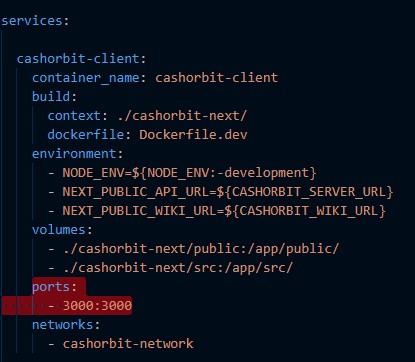
In addition to the port binding, certain containers are instructed to expose their ports to localhost via their Dockerfile.
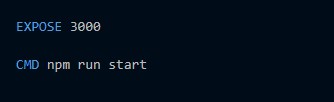
This allows containers with explicitly exposed ports to be accessed from both within the docker vitrualized network, as well as directly from the host network. For containers that do not have explicitly exposed ports, they are only able to be accessed via the virtualized network. This is done to further mimic a real world use-case of having certain portions of the app stack only accessable via subnets from one or more publicly exposed servers.
By default the port mappings are as follows:
*Always refer to the docker-compose.{environment}.yml for the exact port mappings, in the event they are changed and this documentation becomes outdated
| Container Name | Port BindingHost:Container |
Network Access point |
|---|---|---|
| cashorbit-client | 3000:3000 |
Exposed - host@localhost:3000 |
| cashorbit-server | 8003:8003 |
Exposed - host@localhost:8003 |
| redis-cache | 6379:6379 |
cashorbit-network:6379 USING service name redis-cache |
| redis-timeseries | 6380:6379 |
cashorbit-network:6380 USING service name redis-timeseries |
| cashorbit-docs | 8080:8000 |
Exposed - host@localhost:8080 |
| cashorbit-scheduler | 8005:8003 |
Exposed - host@localhost:8005 |
| cashorbit-help | 3505:3000 |
Exposed - host@localhost:3505 |
| cashorbit-wiki | 3333:3333 |
Exposed - host@localhost:3333 |
For containers with Network access points only available on the Docker virtualized network, their service-name can be used as an alias for their docker network host. See General Configuration -Networking
Deployment commands
A collection of commands used to execute various deployment actions.
These commands are used within the Github Actions CI/CD pipeline. The order in which they are executed are located in the action runner definitions located at {repo-root}/.gitub/workflows/deploy_{environment}
| Makefile Command | Action |
|---|---|
| login-to-aws-ecr | Grants authentication to current shell proceess, allowing access to AWS resources from the AWS CLI tool. |
| tag-docker-image-for-ecr | Adds a docker tag to the currenly being built image for identification by AWS elastic container registry. |
| push-docker-image-to-ecr | Extends the above tag command first, then pushes the tagged image to the AWS elastic container registry. |
| pull-docker-image-from-ecr | Pulls the currently built and tagged image from the AWS elastic container registry *note1 |
| create-elasicbean-version | Creates an environment version in the elastic beanstalk application for the newly deployed image, including the source bundle definition found in the elasticbean-source-bundles s3 bucket *note2 |
| deploy-elasticbean-version | Instructs the target Elastic Beanstalk Application to rebuild with the newly updated application version |
*note1: Currently the build and deploy pipeline does something strange, it tags the image, pushes it, immediately pulls it, then re-tags and pushes it again. No idea why it does this, will investigate / update documentation post prod deployment
*note2: Currently the only source bundle definitions available are for the soon-to-be production environments. This s3 bucket will eventually contain definitions for both staging and dev environments as well, and the makefile will be updated accordingly.
CI Pipeline
The CI/CD pipeline can be triggered from the Github Actions tab from the repository webpage. This is currently a manual process, but will eventually be set up to be triggered by various git actions such as successful PRs and branch merges/rebases.
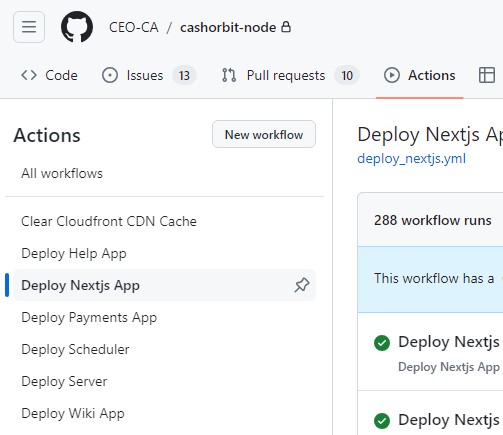
To trigger a deployment for a specific environment, navigate to the Github Actions tab, and select the target environment from the list on the left.
Then select the branch you wish to deploy from, from the 'Run Workflow' dropdown on the right.
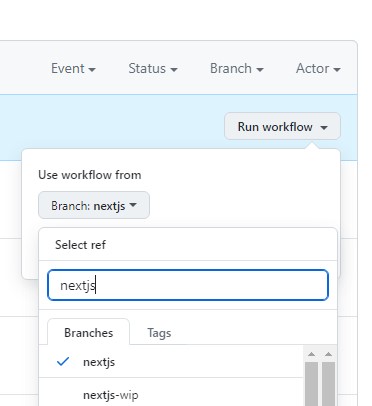
*Currently the only branch configured to deploy to AWS is the nextjs branch