Architecture
AWS Cloud - Updated Architecture
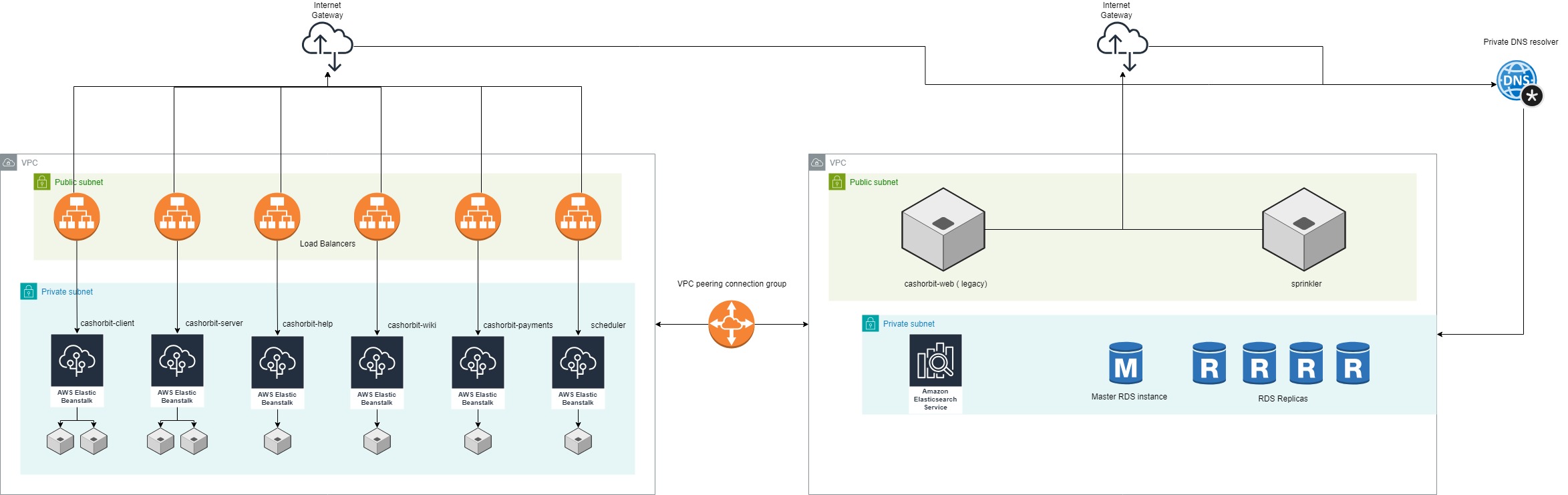
The new architecture for the collection of CEO applications is relatively straightforeward and nearly identical across all applications. Each application is deployed in a manner that allows for great flexibility and scalability, including features such as automatic instance scaling, dedicated load balancers, SSL offloading, and immutable build policies.
Elastic Beanstalk
Each application is configured to have multiple environments managed under it. These environments can be added or removed automatically by the AWS load balancer based on usage metrics gathered from the other environments. This allows for a high uptime and a degree of fault resiliance, ensuring that users don't loose access to the live application in the event that any single instance goes down. Each application's load balancer is provisioned within the public subnet of the shared VPC, and each given it's own DNS record. The load balancers provide automatic SSL offloading to the environments they manage, which are all hosted within the shared private subnet of the VPC, preventing direct access to the instances themselves from outside connections.
The shared VPC connects to the legacy VPC via a peering connection group, allowing it to access resources within the Legacy VPC via their AWS ARN. This ensures a non open-internet network connection between sensitive resources, such as the API and Opensearch or RDS instances. The Master RDS instance specifically is given a private DNS entry, and requests to this resource specifically go through AWS's Private DNS resolver rather than directly between VPCs.
Each load balancer has it's own security group, allowing for fine grained access control, as well as other useful features such as live monitoring and alarms, log streaming and rotated log storage, and CLI accessable update and rollback commands.
For a detailed walkthrough of the AWS Elastic Beanstalk architecture and setup process, see This Video
Redis and Opensearch
Both redis and opensearch clusters are hosted within the legacy VPC and are directly accessed by AWS ARN through the peering connection group. For local development access, a SSH tunnel can be opened to either of the Opensearch instances with the following commands:
CASHORBIT-2021 INSTANCE: ssh -NfT -L 9200:vpc-cashorbit-2021-d5tmg54h7aa2kthozarho53aum.us-east-1.es.amazonaws.com:443 -i ~/.ssh/id_ed25519 developer@developer.ceo.ca
SEDAR-FILINGS INSTANCE: ssh -NfT -L 9200:vpc-sedar-filings-y6wuwnlrbjuglckkwfbxibbi5a.us-east-1.es.amazonaws.com:443 -i ~/.ssh/id_ed25519 developer@developer.ceo.ca
CLOSE TUNNEL: lsof -ti:9200 | xargs kill -9
This will proxy localhost:9200 to the Opensearch instance on port 443. To gain access to the required ssh key id_ed25519 please contact Sabadash or Carlos.
AWS - Legacy Architecture
The current legacy architecture is much different than the updated architecture. All applications and microservices are run off of a single instance, cashorbit-web i-0b112d321d1404839. Each service is handled through supervisorctl and is manually started and stopped by directly accessing the instance through a SSH shell. This one instance is currently running the:
- API
- Front end
- Admin panel
- Ads-admin panel
- Help app
- Wiki app
- Payments app
The only applications that are not currently run on the 'legacy instance' are the Scheduler (net new to New.ceo), the Sprinkler app (see Sprinkler), and the News and SEDI bots (see News and SEDI bot). The overall network architecture can be seen in the right half of the above image.
Deploying to Production
This section will be dedicated to the exact steps required to switch from Legacy to the New Architecture for our first Prod deployment. It is a relatively short process, and mostly involves swapping DNS records in Route53.
The following records need to be deleted:




The following records need to be created:






The News and SEDI bot need to be reconfigured to send data to the new API URL, SSH into the Digital Ocean server (see News and SEDI bot) and run the following commands:
- sudo nano/etc/supervisor/conf.d/news_bot.conf and sedi_bot.conf, change --location=api.ceo.ca to --location=pro.ceo.ca in both
- sudo supervisorctl restart news_bot
- sudo supervisorctl restart sedi_bot
IMPORTANT NOTE: THIS CAN ONLY BE DONE BETWEEN 11PM and 4AM EST - IF THE BOT IS RESTARTED DURING A FTP TRANSFER OR A DB ACTION IT WILL BREAK THINGS BADLY
Various ENVs on the Elastic Beanstalk environment configurations need to be changed, specifically anything that references new.ceo.ca to be changed to ceo.ca