Configuration
Containers
The containers run by docker-compose have multiple variants based on the environment target. These variants can be switched between in order to simulate different hosted environments, or to target different hosted APIs or databases based on the needs of the developer.
CURRENTLY ONLY LOCAL DEVELOPMENT MODE SUPPORTED
General Configuration
- Environment binding: The run command selects an .env file from each of the
cashorbit-{application}/config/folders to use for connecting the local containers based on the build target. This will contain information such as the hostnames for the containers, database credentials, and other environment variables that may be needed. - Networking: Because the containers are connected via a docker network bridge, hostnames can be aliased to their service-name as defined in the
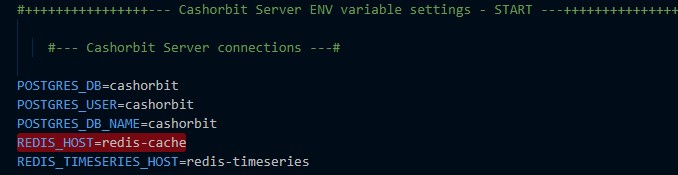
docker-compose.yml. This will automatically resolve to the IP the container is assigned by the docker network manager. You will see host related environment variables containing just the names of the service they are targeting for this reason. An exception is the hostname for the API, as it runs a dedicated server inside the container and exposes a specific port for receiving HTTP requests. This is why the front-end can still connect to the API over http://localhost
A service name indocker-compose.yml:
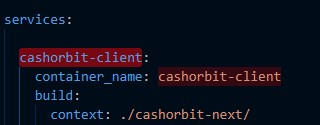
The service name being used as a connection string passed in by the .env:
despite being bound to the 'host network', internally the containers have no context of this binding. When a port is exposed via the Dockerfile, it allows containers to access other containers via thehttp://localhostconnection string. Under the hood, what this is doing is binding the container, to the docker network, and port forwarding to the host network.
e.g:container@127.0.0.1:{port} -> docker-network@172.0.0.X:{port} -> host@127.0.0.1:{port}
Containers that do not have exposed ports only bind from the container to the docker network, and are therefore only discoverable when using the docker network interface.
e.g:container@127.0.0.1:{port} -> docker-network@172.0.0.X:{port}
which is why these containers cannot be accessed via a simplehttp://localhostconnection string - Hot reloading: The front-end and API containers benefit from hot reloading code. This is accomplished by volume mounting the src directories of the respective applications to the container filesystem, and running a file watcher process such as nodemon to automatically detect changes. Think of the volume mount essentially a symlink between files on the host system and files inside the container.
Local
Local mode is meant to be a completely isolated environment running on the host machine. It has virtually no interaction with externally running APIs. It allows the developer to have complete control over the environment, and manipulate any of the containers at will without affecting others' work.
NOTE Currently, the one exception to the above is that local mode connects to the existing staging database on AWS. in the future, this will be changed to connect to a shared development database hosted on AWS. This is due to the need to be able to access shared data and data in a volume that mimics the live site.
Local mode can run any or all of the following containers:
| Service Name | Function | Network Bridge | Contains connection details for: |
|---|---|---|---|
| cashorbit-client | Front End | cashorbit-network |
API container running on localhost |
| cashorbit-server | API | cashorbit-network |
Redis, wiki, help containers running on the docker network |
| redis-cache | Redis | cashorbit-network |
N/A, listens on a port defined in the docker-compose for requests |
| redis-timeseries | Redis | cashorbit-network |
N/A, listens on a port defined in the docker-compose for requests |
| cashorbit-wiki | Wiki | cashorbit-network |
N/A, listens on a port defined in the docker-compose for requests |
| cashorbit-help | Help page | cashorbit-network |
N/A, listens on a port defined in the docker-compose for requests |
| cashorbit-docs | Docs | N/A |
N/A, does not make or receive requests from any container |
Development
TBA - will eventually be just the frontend container connecting to a remote development API on AWS using hosted redis and database instances. Will be differentiated by 'local' mode in that local will run the API locally for backend developers, whereas development mode will only run the frontend. These modes will be renamed appropriately.
Staging
TBA - will eventually be just the frontend container connecting to a remote Staging API on AWS using hosted redis and database instances. This will use the staging DB that Local mode currently uses.
Production
Not allowed. Don't access production from local. No docker configs are provided for this reason.
Filesystem
Each container has it's own filesystem that contains the application source relevant to running that particular portion of the app and both the API and Front-end containers follow a similar file hierarchy. The Redis containers inherit their file hierarchies from the images they run pulled from dockerhub.
General File Structure
Each container's WORKDIR is defined in it's Dockerfile. This entrypoint can be considered the 'root' level for all relative file paths and commands executed inside the container.
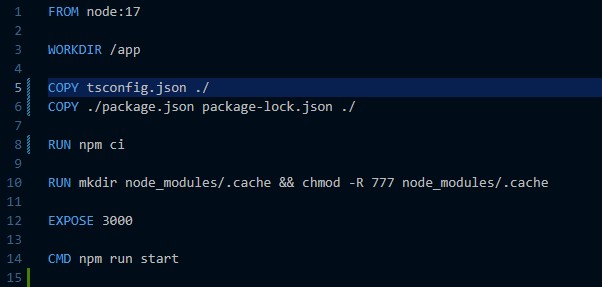
For example, the WORKDIR is defined as /app, meaning the COPY tsconfig.json ./ and CMD npm run start commands will both be run from the level of /app.
The importance of this, is all files need to be placed into the container at an appropriate place relative to /app based on the sourcecode file structure.
Volumes
Volumes are used to leverage the Docker cache, as well as provide support for hot reloading files. Volumes work by defining a location relative to the docker-compose.yml being run, and binding it to a path inside the docker container relative to ~/. They are defined in the respective service definition for the container.
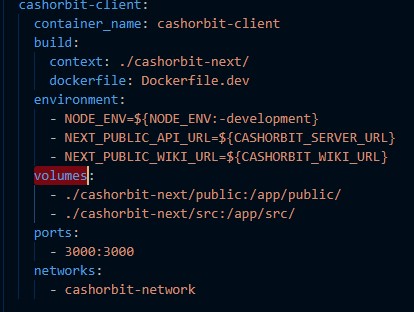
For example, the docker-compose.yml is being run from the root of the repo. in the volumes: definition, it is specifying that ./cashorbit-client/public should be mounted inside the docker container at /app/public/ i.e host:container. Same with the /src/ directory. The end result is that we have a docker container that runs commands from /app/ and contains directories that match what the host file system contains in ./cashorbit-client/.
Another type of volume used is a Named Volume. These types of volumes are explicitly handled by the Docker volume cache and therefore do not need to map to a path on the host.
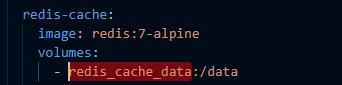
This service is using a named volume. It works identically to the previous example, however instead of binding to the host, it stores the contents in the Docker volume cache that can be accessed by a specific name i.e cache:container.
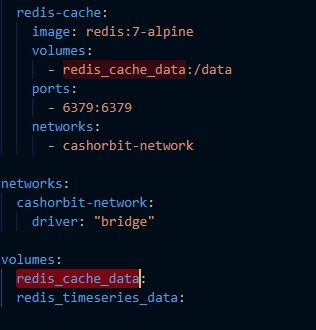
Volumes only work in the context of a local filesystem. Deployment related docker-compose files and dockerfiles differ in this way, as they do not rely on volume mounting and explicitly copy the required source files into the container. This is due to Github Actions (CI/CD pipeline runner) not supporting volume mounting due to no reference to a local filesystem during the pipeline build process.
Node Modules
From the previous example, it is obvious that node_modules is being excluded from the volume mounting. This is done explicitly to preserve environment agnosticism. Node_modules are excluded from any of the volumes because they will use the ones found pre-installed on the host, and this can cause incompatabilities between the host and the docker container, or between developers working on different OSes/processor architectures. Instead, the package.json and package-lock.json are copied into the container at build-time and installed specifically for that container. Any incompatabilities in the json definitions are resolved at this time, and because the same docker image is used between all developers, the exact same set of node_modules is installed every time. If the node_modules were both installed manually, and mounted in with a volume, the volume would take precedence and overwrite anything done during the build process. Docker does however cache the results of the install between container builds, allowing it to mount previously installed node_modules from a cache, but it will intelligently invalidate this cache if it recognizes changes in the either of the package files.
see Setup for details.
Persistent Storage
Persistent storage is achieved through the use of Named volumes. Because they are stored both outside the host file system, and in a volume cache, they are able to persist between container and image rebuilds. This allows us to both store these data files outside of git, and also easily erase them if needed.
Redis
The redis cache file is stored in a named volume called redis_cache_data or redis_timeseries_data depending on the redis service. On init, the container will do it's inital setup and begin writing to a file in the docker file system. This file is then mounted into the volume stored in cache, and is replaced on every subsequent build of the redis container.