Development
The purpose of this document is to explain some of the idiosyncrasies of using the app, as well as explaining any general purpose functionality of different services. Anything that is worth noting or explaining due to not being overtly obvious will be included here. This page is perpetually WIP and should not be considered a complete account of the entire group of apps. As such, feel free to add anything that could be deemed 'worth mentioning'.
Front End
Registering for an account
DOCUMENTATION NEEDED
Back End
DOCUMENTATION NEEDED
ALL ACCOUNT TYPES
There are multiple permutations of account types, both for regular users as well as for moderators/admins. DB tables are denoted with {table}/{column}: {value}
- User accounts: Pro can have any permutation of the database settings (one or more of the letter flags).
| Account Type | Database Settings | Differences |
|---|---|---|
| Free | users/prouser: false, user/exchanges: null | free user, no access to L2 charts, has ADs |
| Pro | users/prouser: true, user/exchanges: {CN} | Pro user, access to CSE L2 charts, no ADs |
| Pro | users/prouser: true, user/exchanges: {V} | Pro user, access to TSX Venture L2 charts, no ADs |
| Pro | users/prouser: true, user/exchanges: {TO} | Pro user, access to TSX L2 charts, no ADs |
| Insider | sedi_insiders: user exists in table | see collection of sedi_insider tables |
- Moderator Accounts: Moderator in this setting refers to user accounts with channel-specific moderation abilities.
| Account Type | Database Settings | Differences |
|---|---|---|
| moderator | user_roles: user exists in table, private_channels: user ID belongs to a channel with the role moderator |
ability to moderate posts |
| owner | user_roles: user exists in table, private_channels: user ID belongs to a channel with the role owner |
ability to moderate posts and add new moderators |
- Administrator: Admins in this setting refer to accounts with admin related abilities (all mod actions + banning, etc). Admins can have any combination of ONE seniority and ONE scope, super_admin flag seems unexclusive and appears to superceed any other settings. Note: currently channel and message admin scopes are NOT used.
| Account Type | Database Settings | Differences |
|---|---|---|
| admin 1 | moderators/seniority: 1 | seniority affects the threshold of being able to trigger an admin action. this is calculated by the offending user's reputation; the higher the rep, the higher seniority an admin needs to be |
| admin 2 | moderators/seniority: 2 | seniority affects the threshold of being able to trigger an admin action. this is calculated by the offending user's reputation; the higher the rep, the higher seniority an admin needs to be |
| admin 3 | moderators/seniority: 3 | seniority affects the threshold of being able to trigger an admin action. this is calculated by the offending user's reputation; the higher the rep, the higher seniority an admin needs to be |
| admin 4 | moderators/seniority: 4 | seniority affects the threshold of being able to trigger an admin action. this is calculated by the offending user's reputation; the higher the rep, the higher seniority an admin needs to be |
| admin 5 | moderators/seniority: 5 | seniority affects the threshold of being able to trigger an admin action. this is calculated by the offending user's reputation; the higher the rep, the higher seniority an admin needs to be |
| admin global | moderators/scope: global | affects the scope of where an admin has admin accounts |
| admin channel | moderators/scope: channel, moderators/channel_id | affects the scope of where an admin has admin accounts |
| admin message | moderators/message: message | affects the scope of where an admin has admin accounts |
| super admin | moderators/super_admin: true | superceeds all other admin levels / checks. full access to all admin actions in all scopes |
ON THE HOUSE PRO ACCOUNTS
In order to give a user a pro account on-the-house, currently we need to manually update the user in the database. In order to set their account to Pro, you first need to find their user in the Users table. Then, set the prouser column boolean to TRUE, add the text CN,V,TO to the exchanges column object (should look like {CN,V,TO} when done correctly), and update the props column object by adding the prop "force_pro": true (should look like {"force_pro": true, ...}). The force_pro prop is what is responsible for flagging a user as a 'house account' and will do two things: A) prevent their account access from being reverted back to a basic account when the subscription checker bot runs the following morning, sees that there is no active subscription in Stripe, and resets their access, and B) prevents that user from being added to the list of paying subscribers when subscriber counts and details are being aggregated to be sent off to TSX for reporting our revenue.
CHANGING A USER HANDLE / USER HANDLE CHANGE REQUESTS
To be able to change a user handle properly, multiple database columns need to be updated to avoid breaking things like notifications, channel subscriptions, watchlists, old comments in spiels, etc. Currently, there is a legacy script available that will process updating a user handle that can be used. In order to use this script, you must access a running instance of the API - currently this is done by connecting to the legacy instance on AWS through the AWS console (cashorbit-web instance). Then, navigate to ~/var/services/cashorbit-node/scripts and run the command node ./change_user_handle.js --prod --old={OLD_HANDLE} --new={NEW_HANDLE}. Note that handles need to include the @ symbol and are CASE SENSITIVE. for example, if my current handle is '@CeoDevSab' and i want to change it to '@regularUSER' i would run the command as such: node ./change_user_handle.js --prod --old=@CeoDevSab --new=@regularUSER.
DOCS APP
The purpose of the docs app is to have a centralized 'source of truth' for all documentation related to the cashorbit suite of apps. It leverages the docker image provided by MKdocs themselves, and uses a standardized Material-UI global style. General theme related settings can be set from the mkdocs.yml file at the root of the docs folder. The goal is to have the documentation of the apps live alongside the codebase and be included in the source control, allowing easy access for developers, and to be in a state that can be deployable to allow access for non-technical team members. An additional bonus is that the documentation can be included in the CI/CD process, allowing automatic syncronization across all methods of accessing the docs (directly from source code, or via the hosted app), ensuring that all instances of the docs are always up to date.
Help App
The purpose of the help app is a collection of basic FAQ pages, linked to from the Front End application. It runs on a standard create-react-app base, and is hosted as a microservice. The Help app is entirely hard-coded information, and is not reliant on any form of content management system.
Wiki App
The purpose of the wiki app is to facilitate user created wiki pages for company channels on the Front End app. The Wiki is a standalone microservice that allows centralization of it's created wiki pages by leveraging Github as a makeshift content management system and source control. When a user initiates creating a wiki page, they are redirected to the wiki app where they can create the content. From there, the application will write a copy of the wiki content to it's local filesystem, and automatically sync new files to the related Git repo. In the event of multiple instances of the Wiki, it will also automatically pull down new git changes and sync the locally stored wiki pages across all instances of the application from the remote Git repo. This method allows quick creation and access to the entirety of all wiki pages, at the expense of local disk space, while still maintaining synchronicity across all wiki instances. When viewing Wiki pages from the Front End, an iFrame is used to inject the content into a popup on ceo.ca without needing to be redirected.
Scheduler App
The purpose of the scheduler app is to sync SEDAR documents between the database and the Opensearch instance that is indexing the text content of the documents. Once the Back End's cron process adds newly provided SEDAR documents to the corresponding database table, the scheduler looks for any new documents that have not yet been ingested to Opensearch. It then scrapes both the provided XML metadata file, as well as the text content of the PDF document. It then updates the relevant database tables with the XML metadata to allow querying from various API endpoints, and creates an Opensearch entry with an associated ID and the text content of the PDF to allow searching content by text. ADDITIONAL DETAILS NEEDED
Admin Panel
Not much is currently known about the admin panel, save for the fact that it is very bare-bones and is in line for a complete rework. It is currently hosted in the same instance as the legacy ceo.ca application, and has it's own nginx routing/exposed port for access.
ADs-Admin Panel
Not much is currently known about the ADs-admin panel, save for the fact that it is very bare-bones and is in line for a complete rework. It is currently hosted in the same instance as the legacy ceo.ca application, and has it's own nginx routing/exposed port for access.
News and SEDI bot
The news and SEDI bots both come from the same repository: cashorbit-bot. Currently they are hosted on Digital Ocean, and are in line for being migrated to AWS, possibly with a rework as a lambda function. Each bot is run from the same source code, with different flags to denote their function. The server is configured to allow FTP access from various news and SEDI vendors we have a subscription with. These vendors upload files to their respective folders, where the bots will push any new entries to the database and s3 for storage. Sedi files are uploaded to /var/services/cashorbit-bot/csv, and news files are uploaded to /home/<news provider>/chroot/wires, with the specific news provider folder specified by which user is connecting over FTP. The server is configured to run the bots via the supervisor and can be interacted with via the supervisorctl command. Currently the only way to access the server is with an SSH connection, requiring someone with existing SSH access to add a new developer's public key to the server first. The connection string for the server is cashorbit@162.243.134.241, and currently only Murat and Sabadash have SSH access (afaik).
Payments app
The payments app is responsible for processing payments for user subscriptions. it communicates with the database for updating user details to denote a 'subscribed pro' status, as well as Stripe for payment processing and charge verification. The Payments app is hosted and run strangely, and is a candidate for a rework in the future. Currently the payments app is a script nested inside the main API filestructure at cashorbit-server/src/services/payments/server.js. When deployed, it is an entire copy of the API, run with a different NPM command, specifically: npm run payments-prod. This will run the server file on the port specified in the NPM command, similar to how the News and SEDI bots are run from the same repo. The reason there is not a dedicated folder for the payments app in the repo is because a lot of the functions the payments app relies on are used by the rest of the API, and vice-versa. This makes them unfortunately, heavily entwined and could not be easily separated from each other without an extensive refactor. When accessing the payments UI from the frontend, it is injected into ceo.ca via an iFrame similar to how the Wiki app is accessed.
Sprinkler app
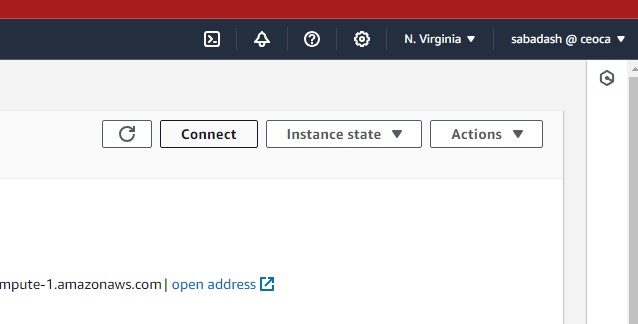
The sprinkler app is still being investigated. At the current time, the sprinkler app is known to be responsible for part of the SEDAR file upload process. It is the main SFTP server, where the SEDAR service we subscribe to uploads new documents. The sprinkler app then uploads these documents to an s3 bucket where they can be accessed by both the API and the scheduler app. The sprinkler app also has a safety mechanism to ensure uploading works. SEDAR will attempt to upload files to the home/sedar/test_uploads folder, then presumably uplon success upload the same files to the portion of the app actually responsible for moving them to s3. This portion of the functionality is still not entirely unknown, but in the event that SEDAR reports being unable to 'push files to sedar@sedar.ceo.ca:test_uploads ' it is most likely because the test_uploads folder is full and needs to be manually emptied. The sprinkler app can currently be accessed via the AWS cashorbit-sprinkler instance. you can get shell access to the instance by clicking 'Connect' in the top right of the instance panel
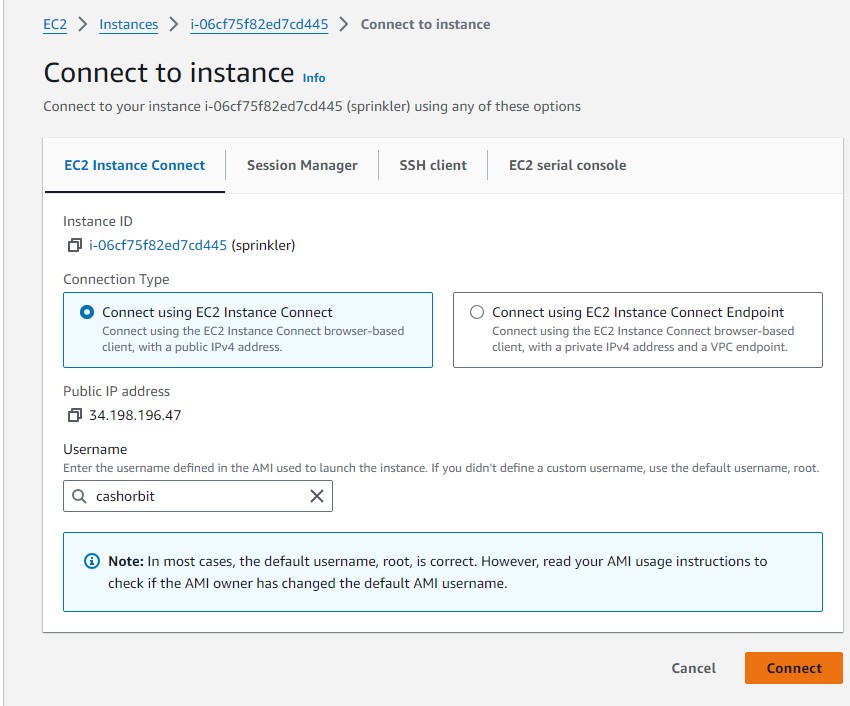
And then providing the user 'cashorbit' on the following page